
From the yard map to the office ledger

Know who is parked, what they owe and what needs attention.

A yard is more than a drawing of numbered spaces. One tenant can have multiple vehicles, a spot can change hands and a payment can cover only part of a balance. Your office needs to see those relationships without rebuilding the story in separate spreadsheets. We build truck parking management software around the yard, tenant records and daily office work, with a real operating example to show you.

Your software project · 1 / 3

What should we automate first?

Select everything that applies.

Free call · no obligation

Built from real trucking experience. Some of the companies CDL Agency works with.

The problem

A map and a spreadsheet can tell different stories.

The lot drawing says a space is occupied. The tenant sheet has an older company name. A receipt is in another folder, and the person who knows whether it was applied is away from the desk. None of those records is useless, but the office has to connect them manually before answering a simple question.

Yard software should make the relationship visible: the company, its contact details, assigned spots, vehicles and ledger. The goal is a workspace staff can use for a move, an invoice or a tenant question. We scope the system around the way your yard operates, including the exceptions that a clean sales demo rarely shows.

What we automate

Before and after, job by job.

01

A color-coded yard map

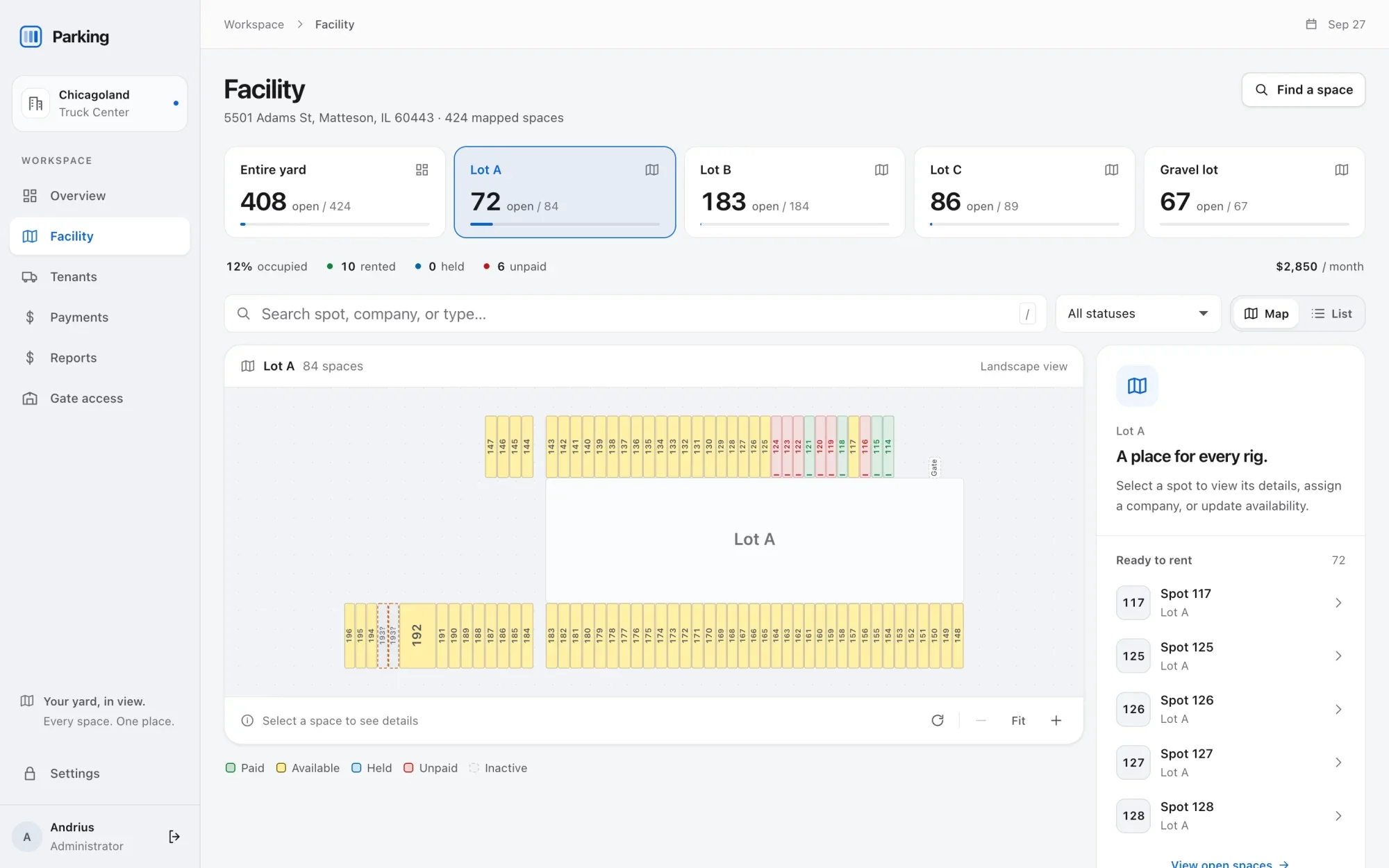
The existing yard system distinguishes available, paid and unpaid spots visually. Staff can use the layout to understand the yard while keeping each space connected to its tenant and records.

02

Tenant company files

Keep MC/DOT numbers, contacts, agreements and IDs together. The delivered system includes SAFER/FMCSA carrier lookup so company information can be checked during office work.

03

Spot assignments with history

Assign spaces by vehicle type and retain a log of moves. A reassignment should be understandable later, when another staff member needs to see how the current layout came about.

04

A ledger the office can follow

The built system records invoices, receipts, partial payments and credits, with PDF invoices. Recording a receipt is distinct from processing a payment; the ledger makes the office record visible.

05

Reports for the back office

Export rent roll, rent paid and aging A/R information to Excel, PDF or CSV. Give the person reviewing balances a usable record of the underlying yard activity.

06

A queue for gate phone changes

Track gate phone-number tasks and staff roles. The queue organizes the work for staff; it does not automatically program a gate or replace the yard’s access-control process.

What we’ve built

Software running in trucking today

Platforms we designed, built and still run for our own operation and our clients.

01Yard software
Color-coded yard map of Lot A — demo data
Product screen · demonstration data

Back-office software for a truck parking yard

Yard software for Chicagoland Truck Center

Built for and run by Chicagoland Truck Center's office staff.

The yard's office runs from one screen: a live map of every spot, a file for every tenant company, and a ledger that tracks what each one owes. Rent roll and aging reports export straight to Excel, PDF or CSV.

  • Color-coded yard map — available, paid and unpaid spots at a glance
  • Tenant files with MC/DOT numbers, contacts, agreements and IDs
  • Spot assignment by vehicle type, with every move logged
  • Invoices, receipts, partial payments and credits, with PDF invoices
  • Rent roll, rent paid and aging A/R reports to Excel, PDF or CSV
  • Gate phone-number queue and staff roles
Explore the yard case study

How we get there

An engineer in your corner.
A plan on your desk.

Start with a conversation
  1. 01

    Have the conversation

    Thirty minutes with you and a department lead. Show us the systems, the repetitive work and the questions you can’t answer.

  2. 02

    Get a written map

    We identify the bottlenecks, measure the baseline and put the opportunities in order. The map is yours to keep.

  3. 03

    Build it with your team

    An engineer works inside your existing tools. Your people review the workflow and test it before it takes action.

  4. 04

    Measure. Learn. Improve.

    We review the numbers together, train your team and decide what to tackle next. One useful workflow at a time.

Engagement

Bring your rent roll and a picture of the lot.

We can start with the layout you already use and a sample of your office records. The first conversation is about your workflow: how a tenant starts, how spots are assigned, how money is recorded and what happens when something changes.

We will separate features demonstrated in the existing application from additions your yard would need. That makes the proposal easier to evaluate and keeps assumptions about payments, gates or financial processes out of the scope.

A real yard application in Matteson

The system built for Chicagoland Truck Center in Matteson, Illinois covers 424 stalls across four lots, with 138 tenant companies imported. It brings the yard map, tenant files and ledger into one office workspace. The public screenshots use [DEMO] data only.

The application includes automatic $20 Zelle fee invoices. That specific feature should not be confused with automatic payment collection, recurring billing or late fees. Gate phone-number changes are handled through a staff task queue, not automatic gate programming. We describe those boundaries plainly so you can assess the actual work.

Evaluate the economics using your records

A useful business case starts with the time your staff spends checking maps, looking up company details, preparing invoices and reconciling records. Add the actual cost of overlapping tools only when you expect to remove them. Do not assume every administrative hour disappears after launch.

The calculator lets you explore an estimate using your inputs. Our yard case study also shows a worked example with explicit assumptions. Neither is a report of measured client savings. Compare the possible benefit with build costs, staff adoption and the checks your operation still needs.

FAQs

Truck Parking Management Software questions?
Find answers.

Have more questions? Reach out or book the audit.

The delivered Chicagoland Truck Center system covers four lots and 424 stalls. A project for another yard starts with its own layout, numbering and assignment rules. We review those details before deciding what can be reused and what needs to change.

No automatic payment collection is claimed for the existing yard system. It records invoices, receipts, partial payments and credits. Payment processing would be a separate requirement to investigate and scope; a recorded payment and a processed payment are different functions.

No. The gate phone-number queue tracks tasks for staff. It does not automatically program the gate. Any proposed connection to access-control hardware would require a separate review of the equipment, available interface, permissions and operational responsibilities.

Yes, importing existing records can be part of the project. The demonstrated yard system imported 138 tenant companies. Your import would need its own field mapping, duplicate review and validation so tenant companies, contacts and assignments end up in the correct places.

The demonstrated application exports rent roll, rent paid and aging A/R reports to Excel, PDF or CSV, and produces PDF invoices. We would review your accountant’s requirements before assuming that a particular format or accounting integration is included.

No. The public yard screenshots show [DEMO] tenants and data. They illustrate the interface without presenting private tenant records as marketing material. The case study identifies delivered features and keeps hypothetical savings separate from verified project facts.

A good place to start

Let’s make room for the work that matters.

Bring the process that slows you down. We’ll map the opportunity, talk through what’s practical, and give you a clear next step.