Yard operations · Worked example
How Trucking Apps Save Companies Hundreds of Thousands a Year (Truck Parking Yard Case Study)
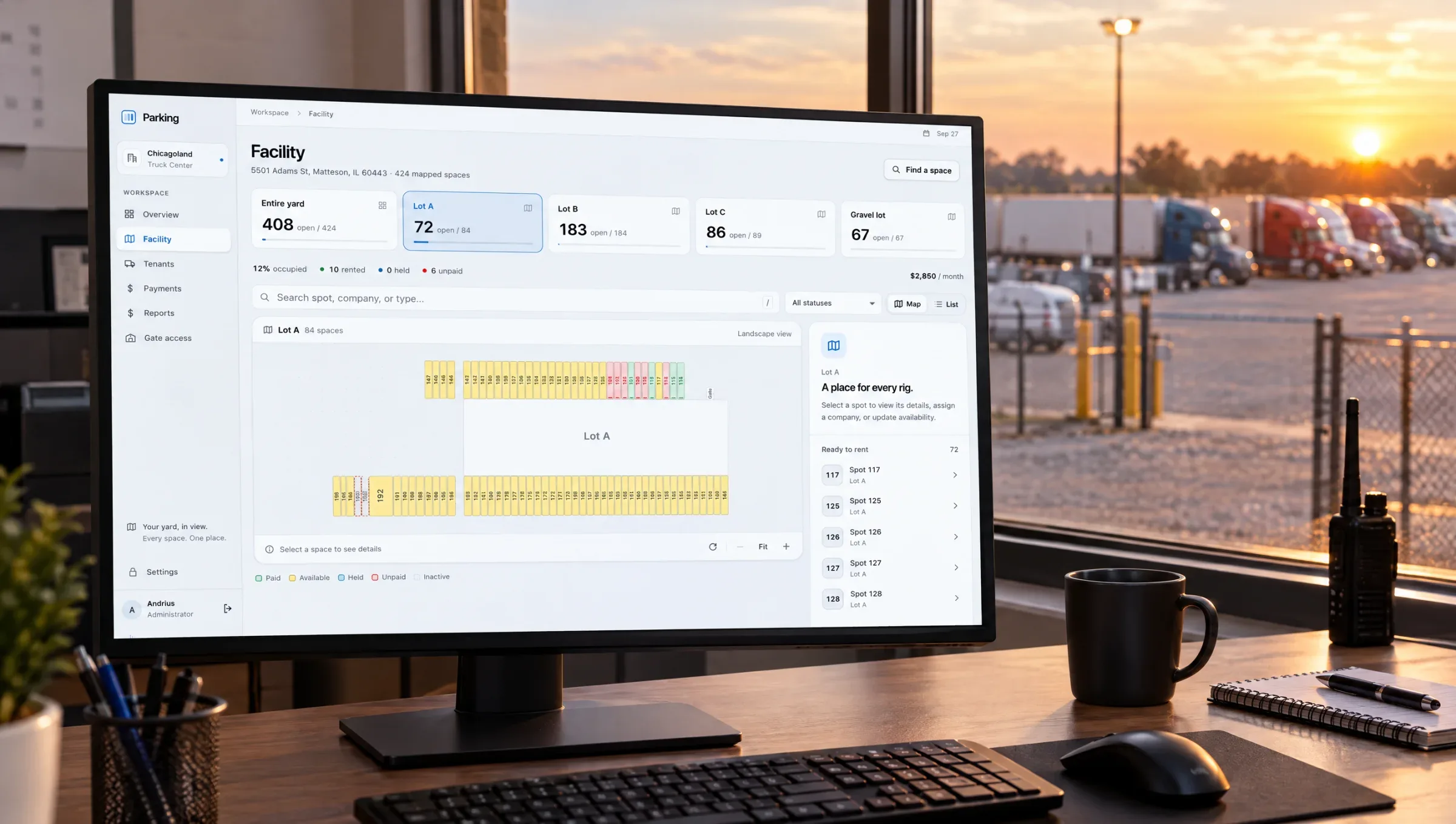
Product illustration. Public application screenshots use [DEMO] data.
The hidden cost of spreadsheets in a trucking office
A spreadsheet rarely begins as a problem. Someone needs a tenant list, an application tracker or a place to record payments. The file works, so more work moves into it. Eventually it becomes the bridge between the people, documents and systems that keep the operation running.
The cost sits in the handoffs. An employee looks up the same company twice. Someone compares the lot drawing with the rent roll. A manager checks a payment before answering a tenant. These are necessary tasks, but the office may be repeating the same search and entry work every time.
That is where custom trucking software can help. It connects the record to the next action. The benefit depends on the amount of repeat work, how well the software fits and whether staff use it. A large operation can have a six-figure opportunity, but a headline is not evidence that a particular company has achieved it.
This article separates a real yard project from a worked estimate. The software exists. The savings assumptions below are illustrative and must be replaced with your own numbers.
The yard before: 146 spreadsheet rows and an Excel drawing
The starting point for Chicagoland Truck Center included a spreadsheet with 146 rows and an Excel drawing of the lot. The office had useful information, but a row and a drawing are different views of the operation. Neither automatically establishes the relationship between a tenant company, its vehicles, assigned spaces and account activity.
The row count is a description of the starting file, not a claim that the yard had 146 tenants. The project ultimately imported 138 tenant companies. Treating those counts as interchangeable would hide the data review involved in moving an existing office process into an application.
A yard workflow also changes during the month. Tenants move spaces, a payment may be partial and a contact number may need updating. The office needs to understand the current state and the history behind it. That is the purpose of the truck parking management software described here.
What we built for Chicagoland Truck Center
The application serves Chicagoland Truck Center in Matteson, Illinois, covering 424 stalls across four lots, with 138 tenant companies imported. It brings the yard map, tenant files and ledger into an office workspace. See the yard software case study for the product screens.
The color-coded map distinguishes available, paid and unpaid spots. Staff can assign spaces by vehicle type, and moves are logged. Tenant files hold MC/DOT numbers, contacts, agreements and IDs, with SAFER/FMCSA carrier lookup available for checking company information.
The ledger records invoices, receipts, partial payments and credits. Staff can produce PDF invoices and export rent roll, rent paid and aging A/R reports to Excel, PDF or CSV. The system also creates automatic $20 Zelle fee invoices and maintains a gate phone-number task queue with staff roles.
Those boundaries matter. This is not a claim of automatic payment collection, recurring billing, late fees or automatic gate programming. A gate task still needs staff action. An invoice records a charge; it does not establish that money was collected. All public yard screenshots show [DEMO] data only.
The project is one example of the trucking software work from CDL Agency. Its features are evidence of what was built, not evidence of measured time or money savings.
WORKED ESTIMATE: put explicit assumptions beside the workflow
The following example uses the yard’s real $48,750 per month in agreed rent as a baseline. Agreed rent is not the same as verified collections. Every recovery percentage, hour, hourly rate, removed subscription and fee count in this table is an assumption.
These are illustrative assumptions, not reported results. They are a way to examine a possible business case, not a claim about what this customer saved.
| Opportunity | Assumption and formula | Illustrative annual range |
|---|---|---|
| Administrative capacity | 8–14 hours saved per week × 52 weeks × $32 loaded hourly cost | $13,312–$23,296 |
| Unbilled or unreconciled spots caught | Assumed recoverable amount equal to 1%–3% × $48,750 agreed monthly rent × 12 | $5,850–$17,550 |
| Duplicate tools removed | $100–$250 in monthly subscriptions actually eliminated × 12 | $1,200–$3,000 |
| Zelle fees now always invoiced in the assumed workflow | 5–12 otherwise missed eligible $20 fee invoices per month × 12 | $1,200–$2,880 |
| Total potential annual value before costs | Sum of the four assumed categories | $21,562–$46,726 |
The first line describes capacity valued at a loaded labor rate. It is not necessarily cash removed from payroll. Staff may use the time for tenant service, collections follow-up or other work. Count a payroll reduction only if you have a separate, realistic reason to expect one.
The second line assumes that a portion of agreed rent would otherwise remain unbilled or unreconciled and can actually be recovered. The percentage is not an observed discrepancy. If your records show no such issue, enter zero. An invoice that was merely paid later is a timing issue, not automatically additional annual revenue.
The fee line assumes eligible fees were previously missed and become collected after invoicing. The delivered feature generates the fee invoice; it does not guarantee collection. Remove fees you were already invoicing, and keep this category out of the rent-recovery line to avoid double counting.
Likewise, a subscription produces savings only when it is cancelled or reduced. Keep a tool you still need outside the total. Finally, subtract implementation, hosting, support, provider charges and any remaining review effort to estimate net benefit. The table shows potential gross value before those costs.
Collect a baseline before changing the process. For an ordinary week, record how often staff check a tenant balance, search for an agreement, update a spot assignment or prepare an invoice. Record the time spent handling exceptions as well as the straightforward cases. After rollout, measure the same tasks using the same definitions. That comparison is more useful than asking whether the office feels faster. It can also reveal that one step improved while another still needs attention, giving the team a concrete next improvement to discuss.
How six figures happens at a larger operation
Scale can create a larger opportunity, but the assumptions need to scale with the actual workload. A 1,000-spot yard does not automatically need the same work per space as a smaller yard. The following is a separate hypothetical operation, not an expansion plan or forecast for the customer above.
For comparison only, applying the same agreed rent per stall gives an assumed monthly baseline of about $114,976: $48,750 ÷ 424 × 1,000. That assumes comparable occupancy and pricing economics, which another yard would need to verify.
| Hypothetical 1,000-spot yard | Explicit annual assumption | Annual value |
|---|---|---|
| Office capacity recovered | 50–70 hours per week across the team × 52 × $35 | $91,000–$127,400 |
| Recoverable billing discrepancies | Assumed 4%–6% × approximately $114,976 per month × 12 | $55,189–$82,783 |
| Tools actually removed | $300–$600 per month × 12 | $3,600–$7,200 |
| Previously missed eligible fee invoices | 15–30 per month × $20 × 12, assumed collected | $3,600–$7,200 |
| Potential annual value before costs | Illustrative assumptions, not reported results | $153,389–$224,583 |
This is how a scenario reaches hundreds of thousands: substantial repeated work plus a material, assumed recoverable billing gap. Those are demanding assumptions, not ordinary expectations. If the operation cannot verify them, it should not use this range in a purchasing decision.
A 50-truck carrier needs a different model. For example, assume four office staff each recover five to eight hours weekly at a $35 loaded rate: $36,400–$58,240 annually. Separately assume 500 monthly invoices averaging $1,500, with a truly recoverable 0.3%–0.6% billing gap: $27,000–$54,000. Add $250–$500 monthly in tools actually removed: $3,000–$6,000.
That hypothetical carrier totals $66,400–$118,240 before costs. Truck count alone does not establish its staffing, invoice volume or losses. These are illustrative assumptions, not reported results. Do not add the yard and carrier examples together unless your own business has both distinct workflows and you have checked for overlap.
Other trucking workflows worth examining
The same approach applies beyond a parking yard. Start with a repeated handoff, define its record and decide where a person still needs to review it.
Driver onboarding and CDL reading. Onboard reads a CDL photo or PDF into an application, prepares carrier submission packets and lets a carrier approve, decline or confirm a hire through a secure link. The AI document processing service focuses on that source-to-application handoff. The existing CDL Agency Onboard page provides more context on the platform.
Driver and carrier communication. Portals can give each participant a clear task and a shared status. A useful portal reduces the need to search across emails and messages, but access, document review and ownership still need explicit rules.
Business phone lines. Onboard Voice supports local number selection, automatic 3CX line setup, team workspaces and line management. A trucking phone-system workflow can address the administrative work around numbers and access. It is a separate product with its own demonstrated features.
Billing and system handoffs. Billing software can connect operational records with invoices and reports. Software integrations can remove repeated entry between supported systems. Verify access and field ownership before assuming two products can exchange the information your office needs.
Build versus buy: start with the complete cost
Buy an existing product when it covers the important workflow and your team can use it without creating another chain of workarounds. Check the actual day-to-day task, including exports and exceptions, instead of evaluating only the feature list.
Consider an integration when your current systems do their main jobs well and the problem lies between them. A small connection may be enough. It still needs supported access, matching rules and visible failures; an unreliable transfer simply moves the checking work somewhere else.
Consider a custom build when a specific process remains awkward or costly and the expected value justifies implementation, ongoing operation and staff adoption. Start with one complete workflow. A smaller scope is easier to verify than a promise to automate the whole office.
For a yard, that first workflow might run from creating a tenant file through assigning a space and producing an invoice. Review it with the person who normally does the work. Include a tenant moving spaces and a payment that covers only part of the balance. If the proposed system cannot explain those everyday cases clearly, a longer feature list will not make the decision easier. Agree on these acceptance examples before development so both the office and the builder know what a usable first version means.
Compare the options using the build-versus-buy scorecard. Include training, migration, provider charges and maintenance, not just the initial quote. We will tell you when not to build.
Start with your numbers
Use the Trucking Office Automation ROI Calculator to enter your own manual hours, labor cost, subscriptions and invoice assumptions. The result is an estimate to investigate, not a promised return.
Then book a software call with a redacted example of the workflow. Bring the spreadsheet, the handoff and the question your team keeps asking. That is enough to begin evaluating what should stay, what could connect and what is worth building.
About the author
Andrius Pletniovas
Founder of Apps For Trucking, the custom trucking software brand of CDL Agency. The software covered here comes from work with driver placements, business phone lines and yard operations.
How we work →